
Sandbox Console
A sandbox-only developer tool for testing out the lifecycle of the employee and employer flows.
Sandbox Console
The Sandbox Console is a sandbox-only developer tool for testing out the lifecycle of the employee and employer flows. It lets you advance an employer through their lifecycle — INACTIVE → PENDING → ONBOARDING → ACTIVE — without actually walking the full onboarding workflow by hand. Use it to validate how your integration reacts to each state and to exercise the /employer/{id}/status endpoint.
The console is sandbox-only. It is never rendered in production.
Where to find it
When you open the employer flow against https://embed-sandbox.benbase.com, you will see a small beaker chip pinned to the bottom-center of the page. Hover it to reveal the label, then click to open the console panel.
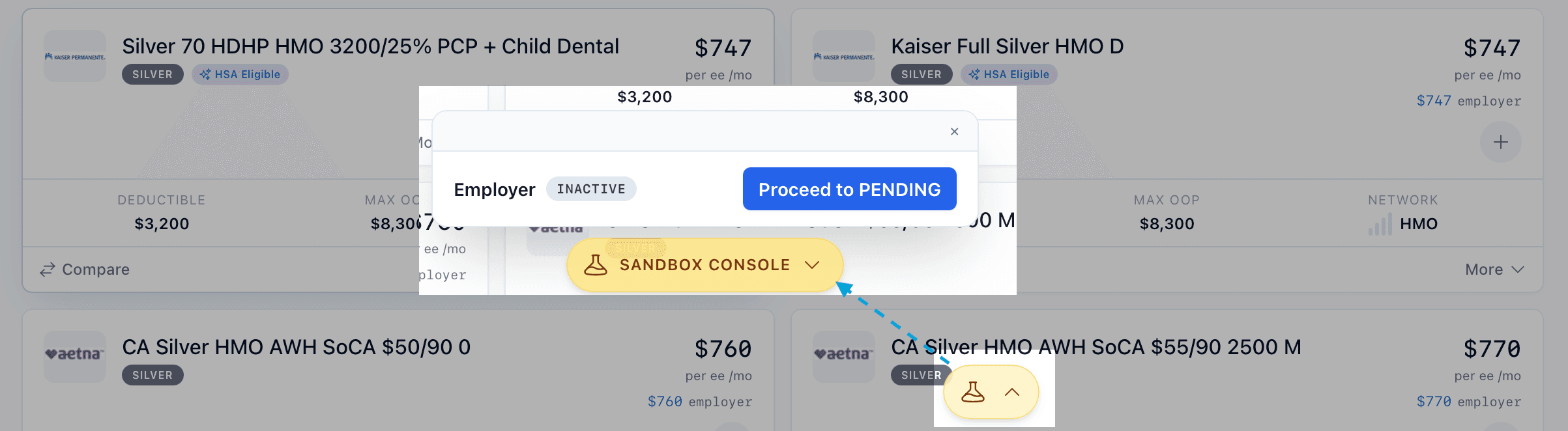
The panel is organised into sections. Today there is one — Employer — which shows the current state as a coloured pill and a single button to proceed to the next state.
Advancing the employer
Each click moves the employer one step forward. Transitions are sequential and one-way: once an employer moves to the next state, you cannot move them back. If you need to retest an earlier state, use a different employer ID.
| From | Action |
|---|---|
INACTIVE | Proceed to PENDING |
PENDING | Proceed to ONBOARDING |
ONBOARDING | Proceed to ACTIVE |
ACTIVE | Final state — start over with a new employer ID |
After a successful transition the employer flow reloads so the rest of your UI re-renders against the new state.
Verifying with the status endpoint
The console's primary purpose is to give you a fast way to exercise GET /employer/{id}/status. After advancing the employer, call the endpoint with the same employer ID and confirm status matches what the console shows.